Product, Live
Paletta
Paletta turns one brand color into design tokens checked for contrast, ready for code and for Figma. Most of the way I ship with AI agents was first set up here.
- Role
- Product design, web app and Figma plugin
- Timeline
- March 2026 – Present
- How it’s made
- Where my way of shipping with AI started
Try it
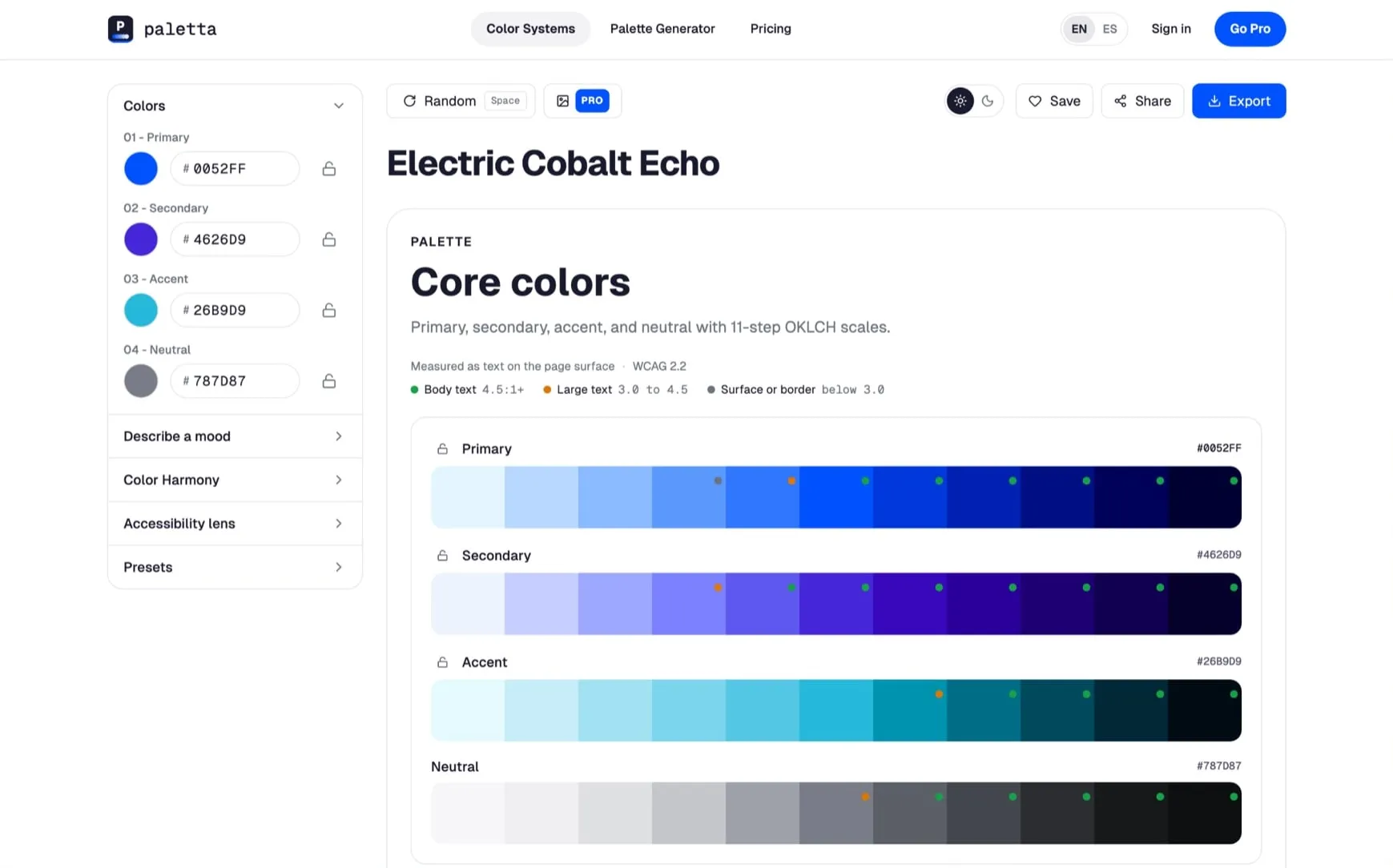
Pick a color and this small version of Paletta puts it on step 500, then builds the scale around it the way Paletta does, with each step checked for contrast. The full product adds vision simulation, more exports and a push into Figma Variables.
One color in, tokens out
Paletta turns one color into a design token system. Pick a base color and it builds 11 steps from 50 to 950 in OKLCH for four roles, checks every text pair against WCAG 2.2 with APCA alongside, and exports the result as code or pushes it into Figma Variables.
The chore it replaces
Every design system I’ve worked on hit the same stretch between picking a brand color and handing tokens to engineers. Someone builds the shade scales by hand, checks contrast in another tool, types the tokens out for code and rebuilds the Variables in Figma. When the color changes, all of it starts again.
- Pick: A brand color, often from a palette site.
- Scale: Shades from 50 to 950, adjusted by eye.
- Check: Contrast, one pair at a time, in another tool.
- Hand off: Tokens typed for code, Variables rebuilt in Figma. When the color moves, back to the start.
How the work runs
I designed Paletta and make every call. Claude does the building, a group of AI agents checks the work, and nothing merges or ships without my go-ahead. The loop is the one the Popshot page walks through, from an idea in my words to a ticket, a build, reviews and a check after it ships.
Paletta is where that setup started. Since its first commit on March 11, 2026, it has over 1,400 commits and more than 800 tickets, and most of its setup became the studio’s shared setup once Popshot needed the same pieces.
- March: Eight agents in the Paletta repo, each with a written area.
- April 21: The checks that hold for any product (tokens, motion, accessibility, UX writing) move to one shared folder.
- May 13: Ticket rules, the workflow and the brand voice become shared skills, and Paletta's agents go from eight to two.
- September 8: Named review agents, starting with Nora, Lena, Theo and Milo, each reading the project's own standard.
Each pull request runs lint, type checks, unit tests, a build and one browser journey. Jarvis, the tool I designed for handing a ticket to agents, ran 33 times here through August; most work since goes through ordinary sessions and the crew.
Decisions, as dated bets
March 18 and April 7: the price. Pro started at $5 a month or $45 a year. On April 7 I moved it to $9 a month or $79 a year. My bet is that a tool for people shipping production systems reads as more serious at that price, and the free plan carries everyone not ready to pay.
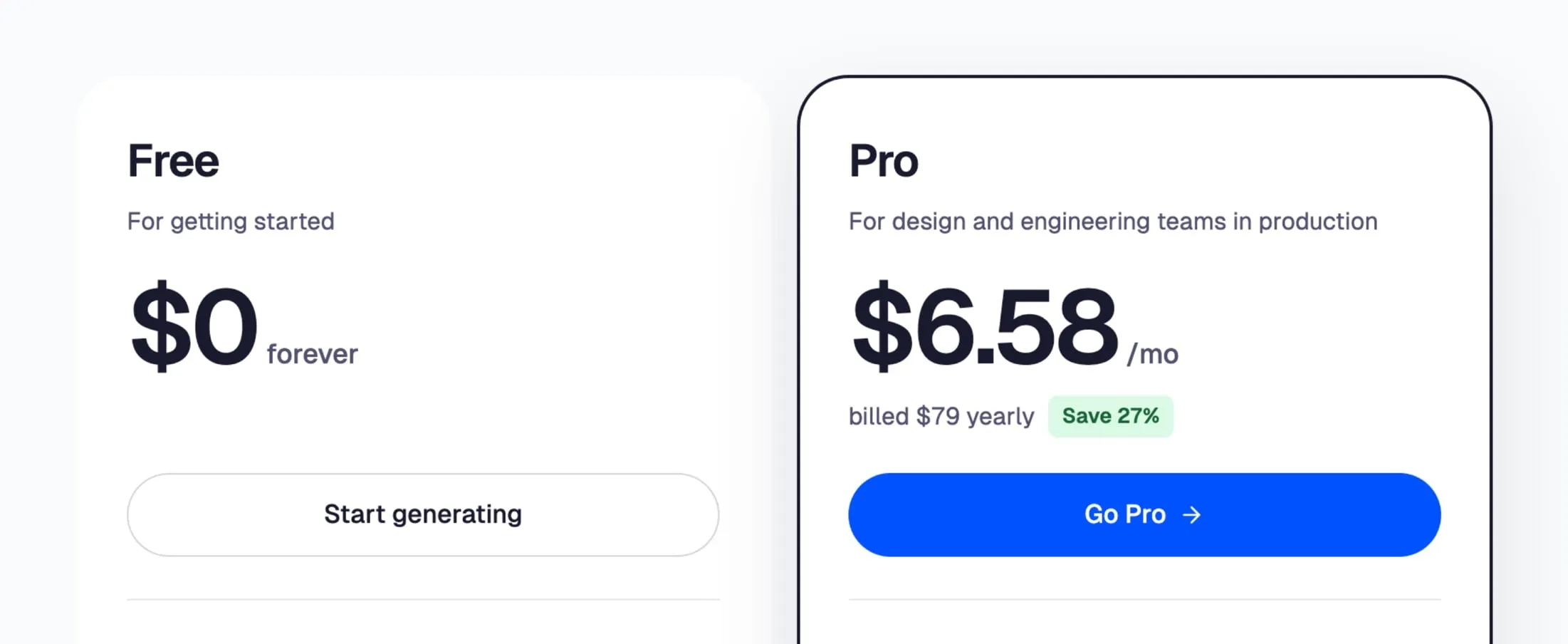
May 3: the real competitor. I first compared Paletta with palette sites like Coolors and Adobe Color. On May 3 I wrote down a different answer: Figma Variables plus the glue scripts a team writes around them. If the people who pay turn out to want inspiration, this bet is wrong.
May 28: Paletta passes its own checks. The site is built on the foundations it sells. Colors come from tokens in three layers, and a check on each pull request fails on raw white, black and gray classes. I chose one blue for every action over a second color for Pro, partly because two similar blues are hard to tell apart with a color vision deficiency.
October 7: Tailwind free everywhere. Tailwind export was free on one screen and Pro on two others. I decided it is free on every surface, and asked for one module to say what is free and what is Pro, with a test that fails when a screen or the pricing copy disagrees with it.
What I said no to: Sign in with Apple and a native iOS app, with no iOS plan behind them. A “Popular” badge on Pro, with no numbers to back it. Saying Paletta syncs both ways with Figma: the plugin pushes and doesn’t pull, so the copy says “push”. A team plan, for now.
Contrast you can check
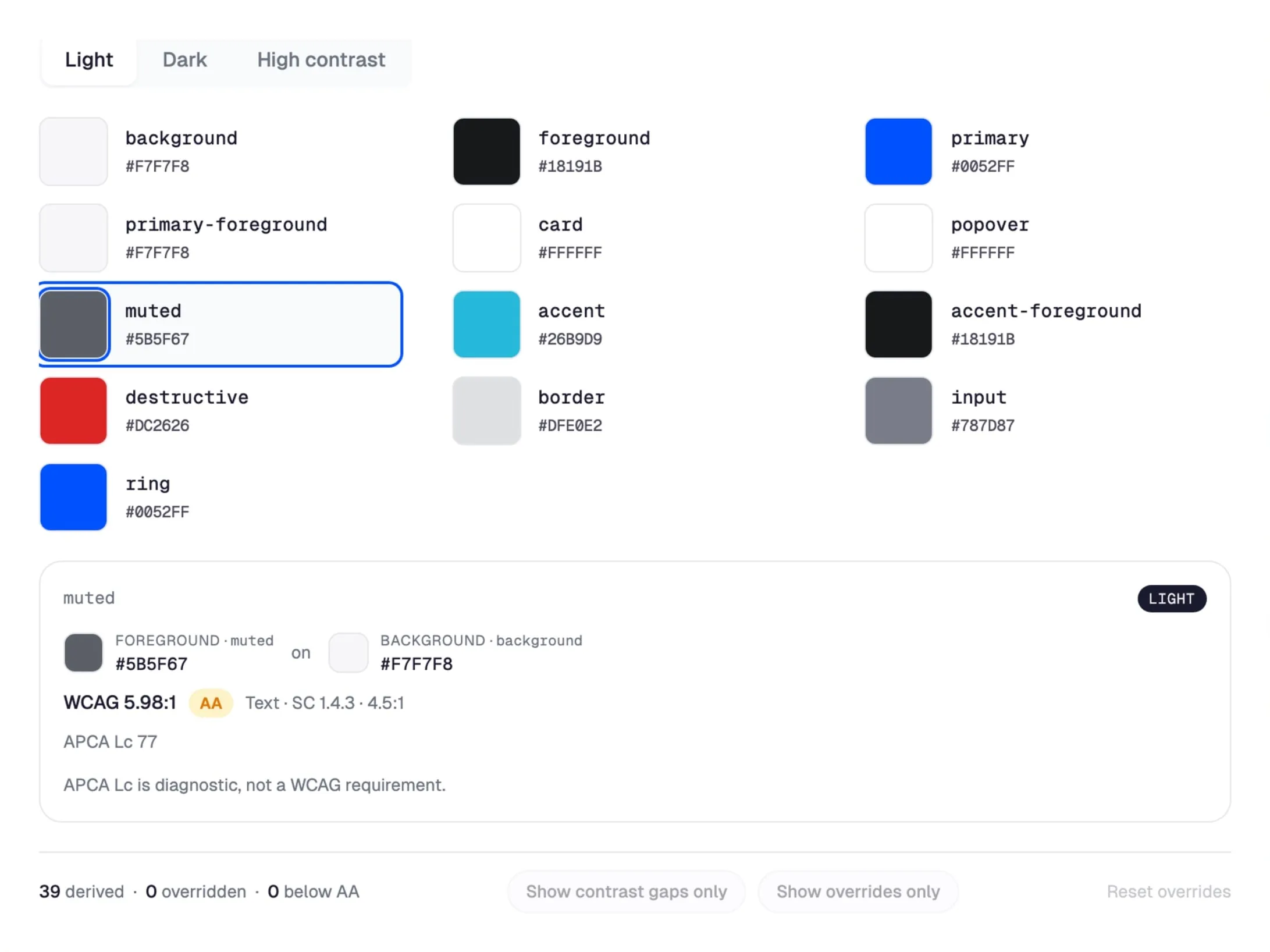
Paletta’s promise is that each pair has been checked, so its verdicts have to be right. In the editors a pair is AAA, AA, AA Large or Below AA, never “Good”, because WCAG levels are what a team can act on. APCA sits next to every ratio as a second opinion, labeled as diagnostic, not a WCAG requirement.
In November the verdicts turned out to mix what WCAG requires with the stricter 7:1 target of Paletta’s high-contrast theme. I had each pair held to what it’s for, with its WCAG rule named: 4.5:1 for text, 3:1 for large text, borders and controls.
The review of that change left one call to me. Body text between 3:1 and 4.5:1 showed “AA Large”, which is only true if the text is large. On November 9 I decided it reads Below AA.
What the process caught
Products made with AI drift toward the same defaults: indigo and violet, and sparkle icons on everything. For a color tool that would mean failing at its one job, so I had a review prompt written that measures a studio product and changes nothing. On November 12 it found eight things on Paletta, among them a homepage demo opening on stock Tailwind violet and a sparkle on a button that isn’t AI. Each became its own ticket.
One finding needed measuring first: with ten vague prompts like “modern SaaS”, seven of ten AI palettes came back indigo or violet.
- Measure: Ten vague prompts, before touching anything. Result: 7 of 10 indigo or violet
- Fix one: The sample colors came out of the instructions. Result: 6 of 10 the same blue
- Fix two: Prompts that name no color now get a random hue hint. Result: 8 different colors
The product today
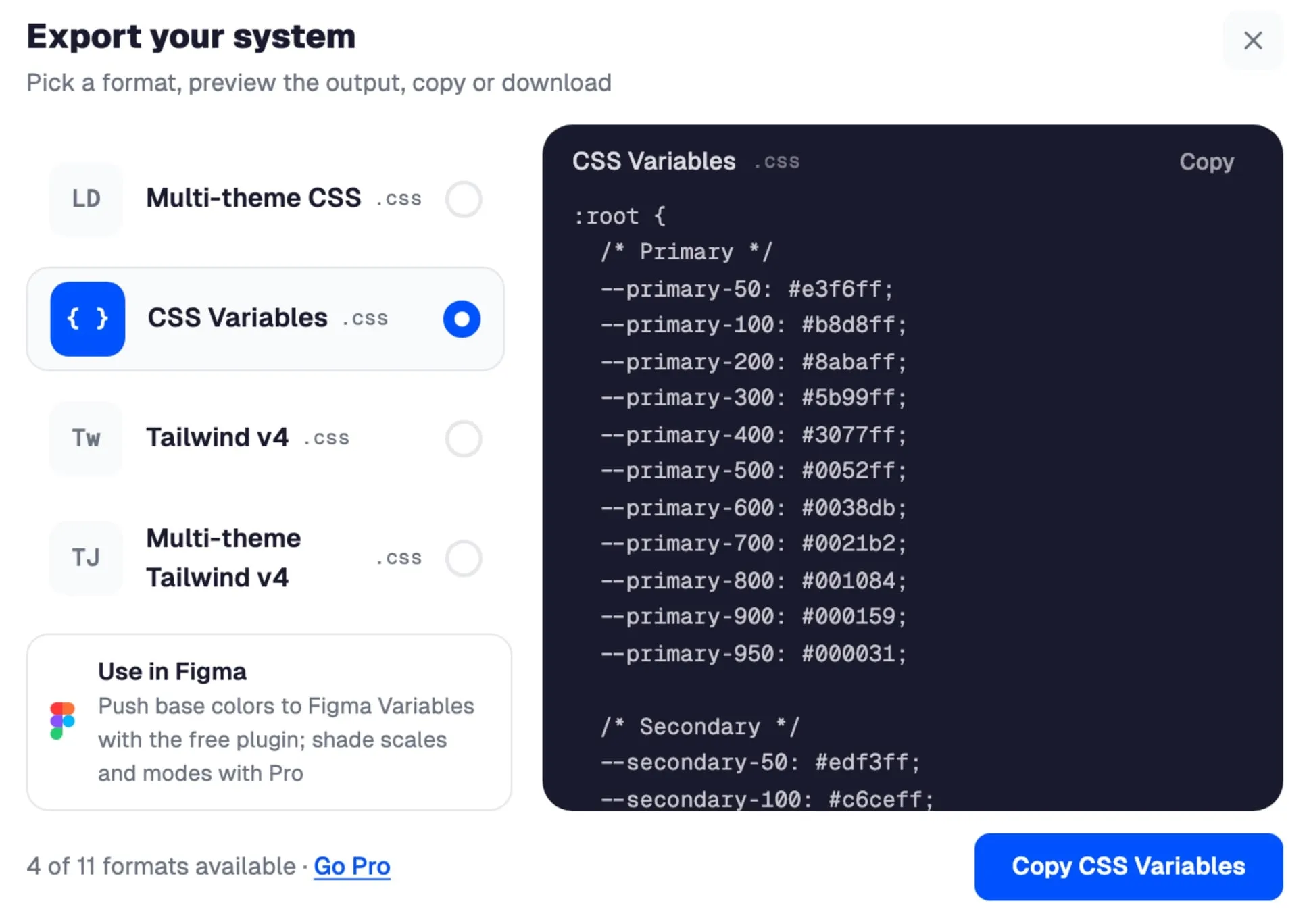
Live at usepaletta.io, free to try without an account. It builds shade scales for four roles in three themes, checks contrast on every pair, previews the palette through different kinds of color vision (all five modes on Pro) and suggests palettes from a description (3 a day on Free). Free exports CSS and Tailwind; Pro adds shadcn/ui, DTCG JSON, Swift and Kotlin for $9 a month or $79 a year. The Figma plugin has been live since May 8, and the app runs in English and Spanish.
What I’m watching next
Since September 30 the Figma plugin has sent anonymous usage events, so I can see how Paletta is used inside Figma as well as on the site. The paid side is still open, and I’m adjusting the plans to what the last few months of usage show.