Product, Live
Popshot
A screenshot editor in the browser, live with a Free and a Pro plan. I took it from idea to launch through my own process: research, product decisions, design, review and release, and nothing ships without my go-ahead.
- Role
- Product design, pricing and launch
- Timeline
- March 2026 – Present
- How it’s made
- Research to release, every change reviewed
From screenshot to post
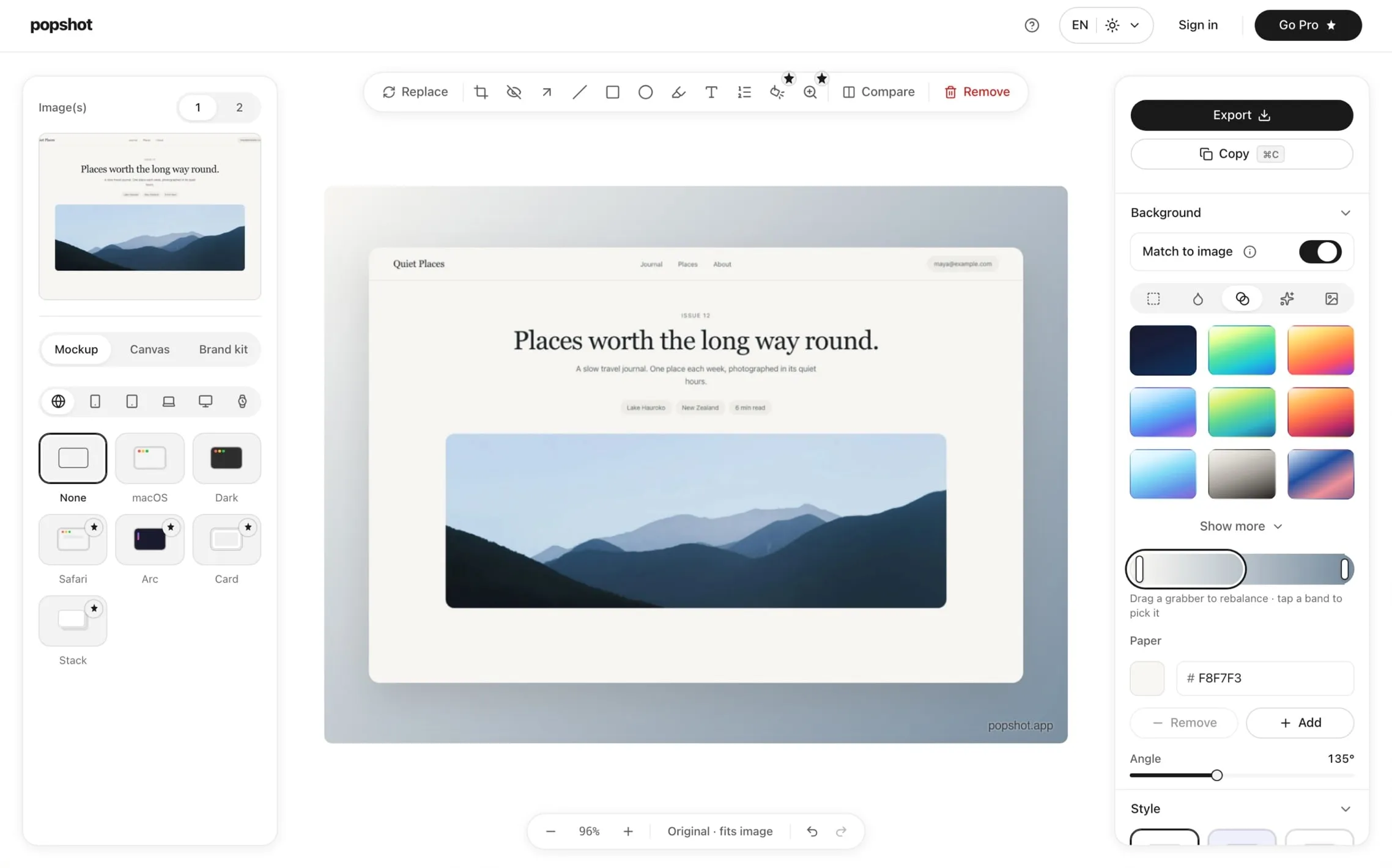
Popshot turns a raw screenshot into an image you can post. Drop one in and it builds a background from the screenshot’s own colors, puts it in a window or a device, and sizes it for each platform. It all happens in the browser.
The same chore every launch
Every product I ship needs launch screenshots that look finished: a frame, a background that isn’t gray, an arrow at the thing that matters, and a file that isn’t 4MB.
The tools that did this mostly asked for an account before showing any output, and kept the good backgrounds behind a subscription. That’s a lot of friction for a forty-second task. I wanted one you open, paste into and export from, then decide later whether to pay.
How the work runs
I designed Popshot and I make every call. Agents do the building, and nothing merges or ships without my go-ahead. When I hand a ticket to Jarvis, the tool I designed to hand work to agents, the work goes around this loop:
- Idea: What the product needs, and why.
- Ticket: What to change, what not to touch, and when it's done.
- Build: An agent makes the change in its own copy of the code.Result: A problem slips in
- Critic: Notes it couldn't verify part of it, then approves.Result: Approved
- Check: Flags an approval that admits it couldn't verify.Result: Flagged
- Review: I send it back or have it fixed.
- Validate: Once it ships, I check it against the idea and against what visitors do.
When I measured the critic in August, 4 of 57 approvals let a real problem through, and in 3 of those it had written the problem down and approved anyway. The check step exists because of that count.
How work starts
Work starts as an assumption in my words. It becomes a ticket with a clear scope and a “done when”, so an agent can build it without guessing. Context carries between sessions through the ticket, a handoff note, and a written lesson for every mistake that cost a session.
How it gets reviewed
Two written checklists are applied before anything is built: one for structure, one for the design system, the copy and accessibility. If a check isn’t clear, it counts as a no. Changes are checked before they merge, with unit tests and the core flow in the engines behind Chrome and Safari. Since the free test minutes ran out, those checks run on my machine and the heaviest suites run on request.
The crew
The reviews come from named agents, each with one job and a written standard to check against.
Judges · the strongest model
- Theo (Critic): Re-measures a claim before anyone acts on it.
- Vera (Scope): Checks the change against the ticket.
- Warden (Security): Reviews payments, accounts and the user's image.
- Nora (Art Director): Checks screens against Popshot's design direction.
- Lena (UX Writer): Checks the words and the accessibility.
Research and upkeep · a faster model
- Milo (Scout): Researches competitors when asked.
- Otto (Upkeep): Finds what should be deleted.
Decides · me
- Andrés (Director): Architecture and the final call.
Running them takes the skills of running a design team: a written standard, and the decision staying with me. The difference is that I don’t take an agent’s word for it, which is why I measured the critic.
Decisions, as dated bets
From day one: no signup, and the image stays on your machine. The editor runs in the browser and never sends the image to a server, so “nothing is uploaded” is true by design.
April: the price. Before launch Popshot was set at $5 a month. Four days later I moved it to $9 a month or $79 a year.
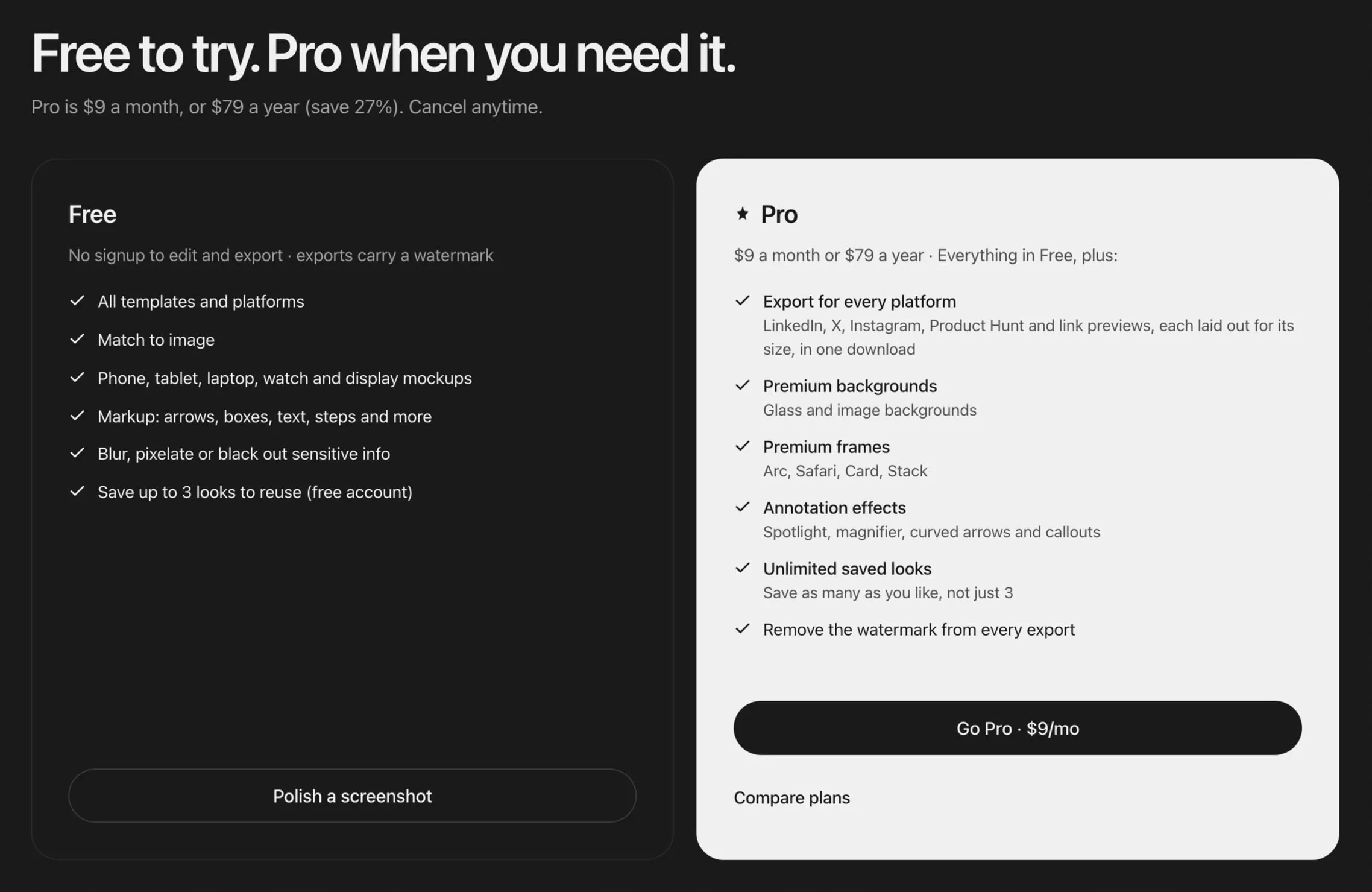
September: keep the watermark. Free exports carry a small popshot.app mark. The closest rivals, at $13 and $15 a month when I checked in September, watermark their free exports too, and free tools already exist. Competing on price wasn’t going to work, so the mark stays as a small credit.
October: Pro sells one thing. Style a screenshot once and get every platform size in one download. My bet is that this justifies the price better than more premium backgrounds, and what Pro buyers choose will tell me if I’m wrong.
November: a landing of its own. Popshot and Paletta had ended up with the same landing page in different words. I wrote a studio rule first: one headline, one main action, and the real product in the first screen. Then I had several directions built as working pages, reviewed them with AI proto-personas, which catch obvious misses, and kept one. PostHog will show whether visitors get further.
What I said no to:
- Rebuilding the app on a new framework so search engines could read it. A small script that turns each page into plain HTML did the job.
- A Mac app before a waitlist shows anyone wants one.
- A template gallery for now. It drifts toward a small Canva, which is a different product.
- A “Made with Popshot” wall with nobody on it, and star ratings that no review backs.
Built to be found
People find a tool like this by typing the job: resize a screenshot for LinkedIn, blur an email address, put a screenshot in an iPhone. So each job has its own page, in English and Spanish, plus a guide to social media image sizes. Every search page is plain HTML, and the build refuses to ship one that comes out empty.
- Searched for “screenshot for LinkedIn”Polished LinkedIn screenshots, in seconds.
- Searched for “blur email in screenshot”Blur sensitive info in any screenshot
- Searched for “iPhone mockup generator”An iPhone mockup generator, right in your browser.
What the process caught
In November a code review found a leftover switch for the old canvas, still read in eight files after the new canvas had replaced it. Fixes could be tested against the wrong version, and a whole session went to a bug that didn’t exist. I had the old canvas removed, with the two export libraries it needed.
The lesson became a studio rule: anything temporary ships with a ticket to remove it. It also became a new agent, Otto, whose job is to find the next leftover.
Earlier, Warden reopened a payments bug marked fixed, because one checkout path still had the bug.
The product today
Live at popshot.app, with no signup to try: 30 canvas presets at each platform’s exact size, 19 device mockups, backgrounds matched to the image, markup and blur for private details, and export up to 3×, or 4× on Pro. It’s fully in Spanish too.
What I’m watching next
Since October, PostHog shows where visitors come from and how far they get in the editor, without cookies unless they accept them. This sprint started from that data, so the work now is getting more of them to the editor: listings in the directories where people look for tools like this, and more pages for what people search. I also have to decide what the free plan should include, from what visitors do in the editor. Then I’ll repeat October’s count of how often AI assistants name Popshot, to see whether the search work moved it.